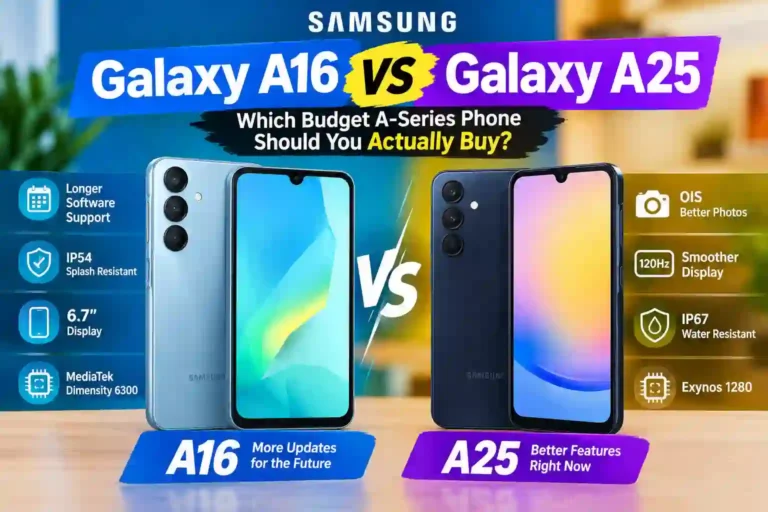
Samsung Galaxy A16 vs Galaxy A25: Which Should You Buy?
Picture this. You’re standing in a phone shop, or scrolling a shopping app at 1 a.m., and two Samsung phones sit side by side. One is newer. One has a bigger number on the box. Their prices are close enough that the choice feels like a trap.
That’s the Samsung Galaxy A16 vs Galaxy A25 problem. Most people assume the higher model number is the better phone. Here, the answer is more interesting. If you’re asking which is better Samsung Galaxy A16 or A25, or evaluating a broader Galaxy A16 5G vs Galaxy A25 5G comparison, the choice comes down to longevity versus immediate hardware perks.
I’ll walk through what actually differs, what matters in daily life, and how to decide without reading ten more articles.
The Short Answer
In this Samsung Galaxy A16 vs A25 comparison, if you plan to keep your phone for four or five years, the Galaxy A16 is the safer bet because of its longer software support. If you care more about camera stabilization, screen smoothness, and water resistance today, the Galaxy A25 has the edge.
Neither is a bad phone. They’re built for different priorities, and the “newer is better” rule doesn’t hold up in this Samsung A16 vs A25 matchup.
One caution: both come in more than one version in some markets (the A16 has 4G and 5G variants, for example), and specs can shift slightly by region. Check the exact model number on the listing before paying. If you’re also considering higher-tier options, check our guide on the Samsung Galaxy A56 vs A36 comparison.
Quick Specs Table
| Feature | Galaxy A16 (5G) | Galaxy A25 (5G) |
|---|---|---|
| Display | 6.7″ Super AMOLED, Full HD+ | 6.5″ Super AMOLED, Full HD+ |
| Refresh rate | Up to 90Hz | Up to 120Hz |
| Chipset | MediaTek Dimensity 6300 | Exynos 1280 |
| Main camera | 50MP (no OIS) | 50MP with OIS |
| Other rear cameras | 5MP ultrawide, 2MP macro | 8MP ultrawide, 2MP macro |
| Front camera | 13MP | 13MP |
| Battery | 5,000mAh | 5,000mAh |
| Charging | 25W wired | 25W wired |
| Water/dust resistance | IP54 (splash resistant) | IP67 |
| Software promise | 6 OS updates, 6 years security | 4 OS updates, 5 years security |
| Launched with | Android 14 | Android 14 |
Specs come from Samsung’s official support channels. Double-check your regional version, since RAM and storage combinations vary widely.
Design and Durability
Side by side, these phones feel like relatives. Flat edges, plastic-feeling backs on some versions, and a camera layout that’s clearly from the same family.
The A16 is the bigger one, with a 6.7-inch screen. It’s great for videos and reading, but it’s a two-hand phone for most people. The A25 is slightly smaller at 6.5 inches and a little easier to manage if you have smaller hands or pockets.
The bigger difference is durability. The A25’s IP67 rating means it’s designed to survive being dunked in shallow water for a short time. The A16’s IP54 rating means it handles splashes and light rain, but you shouldn’t drop it in a sink.
Does that matter? If you’re the type who uses your phone in the kitchen, at the beach, or in a monsoon-season commute, yes, it does. If your phone lives in a pocket and a desk, probably not much.
Water resistance ratings also don’t cover liquid damage, and warranties usually don’t either. Treat the rating as a safety net, not permission to swim with it.
[Your note: how each phone feels in hand, if you’ve held them]
Display: A16 vs A25 Display Comparison
Both use Super AMOLED panels at Full HD+ resolution, which is a real advantage at this price point. Colors look rich, blacks look properly black, and text is sharp on both.
The refresh rate is where you’ll notice a gap in this A16 vs A25 display breakdown. The A25 goes up to 120Hz, so scrolling through social feeds, settings, and web pages looks noticeably smoother. The A16 tops out at 90Hz, which is still smoother than a basic 60Hz screen, but a little less silky.
Here’s a practical thing many people miss. Smoother screens use slightly more battery. On both phones, you can adjust this:
- Open Settings.
- Tap Display.
- Tap Motion smoothness.
- Choose Adaptive for smoothness or Standard to save battery.
If you are tweaking UI settings, explore our guide to the best One UI settings for Samsung phones. If you’re on the A25 and battery life feels short, adjusting motion smoothness is the first thing worth trying.
The A16’s larger screen does have one perk: video and gaming feel more immersive. If you mostly watch YouTube or read, that extra size may matter more to you than 120Hz.
Performance: A16 vs A25 Performance & Chipsets
This is the part where spec sheets mislead people. When analyzing Galaxy A16 vs A25 performance, remember that nobody buys these phones for raw gaming power, so the question is simply: will it feel slow?
The A25 uses the Exynos 1280, and the A16 uses the Dimensity 6300 (in its 5G version). Both are entry-level to lower-midrange chips. For messaging, calls, maps, streaming, banking apps, and casual browsing, both do the job well.
Where they’ll separate is heavier use: switching quickly between many apps, playing demanding games, or keeping lots of tabs open. In those situations, RAM matters as much as the chip. A phone with more RAM will feel snappier than a same-chip phone with less. If you have a choice, pick a higher RAM variant rather than just more storage.
A realistic expectation for both: casual games like Subway Surfers run fine. Heavy 3D games such as Genshin Impact will need lowered graphics settings, and you may still see stutters. If performance drops or lagging occurs over time, troubleshooting steps like those in our Samsung lag fixing guide can help keep One UI running clean.
[Your note: real-world speed impressions, app opening, multitasking]
Cameras: Samsung Galaxy A16 vs A25 Camera Comparison
Both phones pair a 50MP main camera with a small ultrawide and a 2MP macro. A quick honest opinion on that macro: on almost every budget phone, it’s a marketing checkbox. Don’t let it influence your decision.
When doing a Samsung Galaxy A16 vs A25 camera comparison, what actually separates the two is OIS (optical image stabilization) on the A25’s main camera. In an A16 vs A25 camera showdown, OIS physically steadies the lens, which helps with:
- Photos in dim rooms, where the shutter stays open longer
- Video, where walking shots come out less shaky
- General sharpness when your hands aren’t perfectly still
The A16’s main camera has no OIS, so it relies more on software. In good daylight, you’ll likely find both give similar, pleasant results. The difference shows up at night, indoors, and with video. For general mobile photography tips, check our guides on improving camera quality and night mode tips.
The A25 also has an 8MP ultrawide versus 5MP on the A16, which gives slightly better detail in wide shots, though ultrawide cameras at this price tier are never a highlight.
Both have 13MP selfie cameras, so video calls and casual selfies are comparable. If you take a lot of photos of kids, pets, or evening events, the A25’s stabilization is the most meaningful camera upgrade here.
Battery and Charging: Galaxy A16 vs A25 Battery Comparison
In any Galaxy A16 vs A25 battery comparison, on paper it’s a tie. Both feature 5,000mAh batteries and 25W wired charging. Neither supports wireless charging.
Practical points for A16 vs A25 battery performance:
- Samsung doesn’t include a charger in the box in most regions, so budget for one. A 25W USB-C charger from a reputable brand works. If charging issues arise, see our troubleshooting on fast charging fixes.
- Real battery life depends far more on screen brightness, refresh rate, and signal strength than on the phone model. For tips on extending uptime, read our guide on how to improve battery life.
- For most people, both comfortably last a full day, and often longer with light use.
If you go for the A25, using the 60Hz setting will stretch battery life a little. On the A16, the 90Hz cap already conserves power effectively.
Software and Update Support: A16 vs A25 Software Updates
This is the A16’s strongest card, and in evaluating A16 vs A25 software updates, it is the main reason many people should pick the newer model.
Samsung promises six generations of Android OS updates and six years of security updates on the Samsung Galaxy A16 5G. The A25 gets four OS updates and five years of security patches.
Why does that matter? Updates are about more than new features. Security patches protect your banking apps, your accounts, and your personal data. A phone that receives patches for six years is a device you can keep using safely for longer, which lowers your total cost over time.
If you are someone who buys a phone and keeps it for several years, that extra year and two extra OS updates carry serious weight. If you upgrade every two to three years anyway, this advantage matters less.
How to Choose in 5 Steps: Samsung A16 vs A25 Which Should I Buy?
If you’re wondering Samsung A16 vs A25 which should I buy, walk through these 5 steps:
- Decide how long you’ll keep it. Four or more years points strongly to the A16. Two to three years leaves both open.
- Think about your environment. Rain, kitchens, beaches, or dusty areas make the A25’s IP67 rating valuable.
- Be honest about photos. If you shoot often in low light or record video on the go, lean toward the A25 with OIS.
- Check the real prices. Look at local listings for the exact variants. A big price gap should decide it. If they’re close, weigh the factors above.
- Check RAM and storage. A cheaper variant with low RAM will feel sluggish over time. Aim for at least 6GB of RAM if possible.
Common Mistakes to Avoid
- Buying by model number alone. Newer doesn’t mean every spec is better. Here, the A25 wins on screen smoothness, camera stabilization, and water resistance, despite being an older release.
- Ignoring the variant. The A16 exists in 4G and 5G versions. The Galaxy A16 5G vs Galaxy A25 5G comparison assumes 5G models, but the 4G A16 uses a different chipset.
- Forgetting the charger. Many buyers arrive home to find no wall plug in the box.
- Buying from unverified sellers. Grey-market units may lack regional warranty support or network band compatibility.
- Paying for storage you don’t need. If you use cloud backups, 128GB is sufficient for most users. Prioritizing extra RAM yields better daily speed.
Helpful Tips Before and After You Buy
- Update immediately. Go to Settings > Software update > Download and install. Fresh phones often have pending security patches.
- Use a case and screen protector. Budget phones aren’t cheap to repair. Adding protective gear early avoids costly repairs.
- Disable unused bloatware. Long-press unused pre-installed apps and disable them to keep One UI running clean. For extra software management, explore One UI hidden features.
- Utilize Device Care. Open Settings > Battery and device care to run periodic storage cleanups and optimize background memory.
- Enable battery protection. Samsung’s charge protection setting caps maximum charge to reduce long-term battery degradation.
Pros and Cons
Galaxy A16
Pros:
- Six years of OS and security updates
- Large 6.7″ Super AMOLED screen
- Reliable 5,000mAh battery life
- Strong value for long-term ownership
Cons:
- No OIS on the main camera
- IP54 splash resistance only
- 90Hz maximum refresh rate
- Larger footprint to hold single-handed
Galaxy A25
Pros:
- OIS-equipped 50MP main camera
- Smooth 120Hz refresh rate display
- IP67 dust and water resistance
- Slightly more compact form factor
Cons:
- Shorter update support (four OS updates)
- Older model that may be harder to source in some regions
- Entry-level chip unsuitable for high-end 3D gaming
FAQs
Is the Galaxy A25 better than the A16?
In hardware areas like camera stabilization (OIS), refresh rate (120Hz), and water resistance (IP67), yes. However, the Galaxy A16 offers longer software support (6 years vs 5 years). “Better” depends on whether you prioritize current specs or long-term support.
Which one has the better camera?
The Galaxy A25 has the edge due to Optical Image Stabilization (OIS) on its main 50MP sensor, which produces sharper low-light photos and smoother videos. In bright daylight, the gap between the two is minimal.
Which phone will last longer?
Software-wise, the Galaxy A16 lasts longer thanks to 6 years of promised Android OS and security updates. Physically, the Galaxy A25 offers better protection against water submersion due to its IP67 rating.
Can these phones run PUBG or Call of Duty Mobile?
Yes, both can run popular online games at lower graphics settings. Frame rate drops can occur during heavy action. If high-performance gaming is your primary need, consider higher-tier devices.
Do they support 5G?
The 5G variants of both devices support 5G connectivity. Network compatibility depends on regional carrier band availability, so check local network specs before buying.
Do they come with a charger in the box?
In most regions, Samsung does not include a wall charger in the box. You will need to purchase a 25W USB-C charger separately if you do not already own one.
Is the Galaxy A25 still worth buying?
Yes, especially if you find it at a discount. Its combination of OIS, a 120Hz AMOLED screen, and an IP67 rating remains strong for a budget smartphone.
Which is better for a parent or first-time smartphone user?
Both work well. The Galaxy A16’s large 6.7-inch screen and extended update lifespan make it very user-friendly, while the Galaxy A25’s water resistance offers extra durability against accidental drops in water.
Final Thoughts
If I had to hand a friend one sentence, it would be this: buy the Galaxy A16 if you want a phone that stays safe and supported for years, and buy the Galaxy A25 if you want better photos, a smoother display, and water resistance right now.
Check your local prices before deciding. When the price gap is small, think about how you actually use your phone rather than relying solely on the spec sheet. And whichever you choose, pick the higher RAM variant if your budget allows—it’s the upgrade you will feel every single day.